Many companies create a WordPress website, publish it online and then think that the work is done. The website exists, the homepage opens, the services are listed, the contact form is in place and, at first glance, everything seems fine. But in reality, after a website is launched, the next stage begins, one that is often discussed much less: website maintenance and regular website management.
A WordPress website is not a static business card that stands unchanged on the internet for years and always works the same way. Behind it is a system: the WordPress core, theme, plugins, forms, database, server, security settings, backups, images, content pages, SEO settings and analytics. If this system is not checked regularly, small problems start to accumulate quietly.
At first, you may not notice anything. The website opens, the menu works and the contact form still seems to be there. But in the background, one plugin may be outdated, there may be no proper backup, the website may become slower, forms may stop sending inquiries, security risks may increase and SEO results may start suffering because of technical issues.
That is why website maintenance does not only mean that someone occasionally clicks the “update” button in WordPress. Good WordPress maintenance means that the website remains technically stable, secure, fast, usable and ready to do its main job: build trust, generate inquiries and bring clients to the company.
In this article, we will look practically at what WordPress website maintenance means, why a company website needs regular management, what can happen if a website is not maintained, and when it makes sense to hand this work over to a specialist.
What is this article about?
This article helps explain why a WordPress website needs regular maintenance, what website management includes and why a technically healthy website matters for SEO, advertising and inquiries.
What is website maintenance?
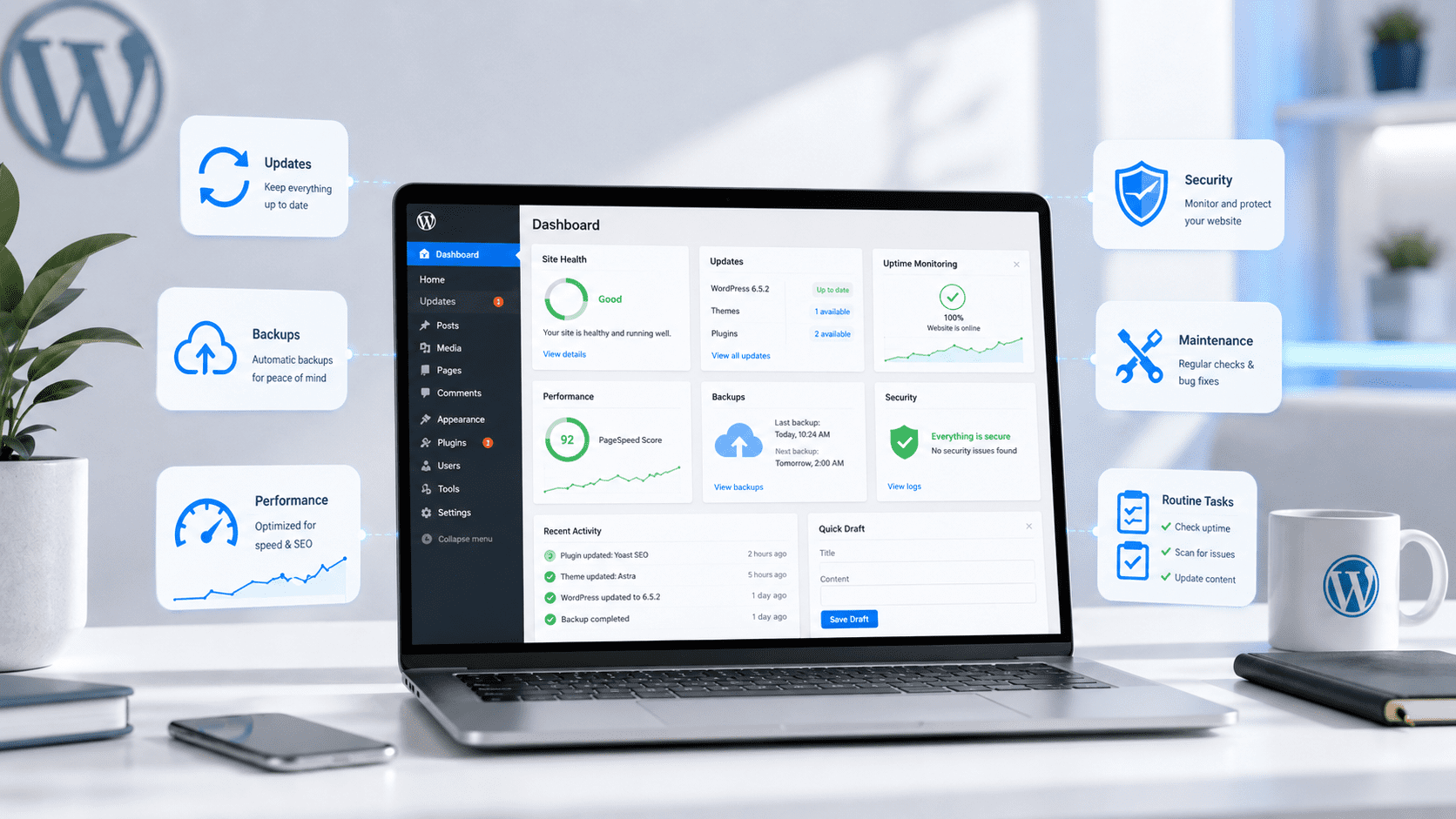
Website maintenance means regular actions that help keep a website technically stable, secure, fast and convenient for users. If we are talking about a WordPress website, maintenance usually includes WordPress updates, plugin checks, theme updates, backups, security checks, form testing, smaller technical fixes and, when needed, content cleanup.
Simply put, it is like car maintenance. A car can also drive for a while without regular checks, but that does not mean everything is fine. If the oil is not changed, the brakes are not checked and small issues are ignored, the problem eventually becomes bigger and more expensive. The same logic applies to a website.
A website may work today. But the question is whether it will work just as well tomorrow, next month and a year from now. This is where website maintenance becomes important for a company.
If the website is a sales channel, a source of inquiries, a landing page for ads or an SEO tool, it should not be left to chance. In that case, the website is part of the business system, not just files on a server.
Why does a WordPress website need regular maintenance?
WordPress is one of the most popular website platforms in the world. Its strength is flexibility: with WordPress, you can create a simple company website, a blog, service pages, landing pages, an online store or a larger content website. At the same time, this flexibility also means that the website consists of many moving parts.
A typical WordPress website may have dozens of plugins, a separate theme, a page builder such as Elementor, a form solution, an SEO plugin, a security plugin, a cache plugin, analytics, a cookie solution and different integrations. Each of them may need updates, checks and occasional fixes.
If WordPress, the theme or plugins are not updated, security risks may appear. If updates are made without a backup and proper checks, something may break. If forms are not tested, inquiries may get lost. If website speed is not monitored, user experience may get worse. If technical errors go unnoticed, this may also affect SEO results.
That is why WordPress maintenance needs a sensible and regular approach. The goal is not to do technical tasks just for the sake of doing them. The goal is to keep the website in a condition where it does not block the company’s marketing, sales and visibility.
Is your website actually in good shape, or has it simply not broken yet?
If your website brings inquiries, supports advertising or is an important part of your company’s visibility, it should be checked regularly. Visibilion helps with WordPress maintenance, technical fixes, SEO and analytics.
What happens if a website is not maintained?
The biggest problem is that an unmaintained website usually does not break in one moment. It rarely happens that everything is perfect today and the entire website is gone tomorrow. In most cases, problems accumulate slowly and quietly.
One plugin is left outdated. Then another one. One form starts working unstably. One image is too large and slows down the page. One page no longer looks good on mobile. The contact form sends emails to the wrong address or does not send them at all. The cookie solution does not work correctly. Google Analytics no longer measures all events. The SEO plugin contains old metadata. Ads bring people to a landing page that loads too slowly.
Each problem may seem small on its own. But together, they can affect a lot: user experience, trust, inquiries, advertising costs, SEO positions and the company’s reputation.
For a business owner, the most dangerous situation is when a problem exists, but you find out about it too late. For example, when a client writes on Facebook that the contact form is not working. Or when Google Ads spends money, but the landing page does not load fast enough. Or when search results start dropping because the website has technical errors that no one noticed.
Regular website maintenance helps prevent such problems, not only fix them after the fact.
What does WordPress maintenance include?
WordPress maintenance can differ depending on the website and the company’s needs. A simple small business website needs one type of maintenance, an active blog needs another, and a system of landing pages built for advertising needs a third. But in general, WordPress website maintenance should include at least the following activities.
- WordPress updates — regular checking and updating of the platform core.
- Plugin updates — safe updating and checking of active plugins.
- Theme check — monitoring the operation of the theme or child theme.
- Backups — regular backup, so the website can be restored if something goes wrong.
- Security check — monitoring suspicious activity, outdated plugins and possible risks.
- Contact form testing — checking whether inquiries reach the right place.
- Page speed check — monitoring images, cache, scripts and general performance.
- Smaller technical fixes — broken links, errors, layout issues and other technical details.
- Basic SEO health check — metadata, indexability, technical errors and Search Console signals.
Good maintenance does not mean simply clicking “update all” in WordPress. In fact, this approach can be risky if there is no backup first, if update compatibility is not checked, and if nobody checks afterwards whether the website still works correctly.
That is why a WordPress maintenance service should be more of a controlled process than a random technical action.
Website management and maintenance: what is the difference?
In searches, people often use both terms: website maintenance and website management. They are related, but they do not mean exactly the same thing.
Website maintenance is more about the technical side. It includes updates, security, backups, speed, form checks, plugin functionality and fixing technical errors. The goal of maintenance is to keep the website stable and working.
Website management is a broader concept. In addition to technical maintenance, it may also include changing texts, adding new images, updating service pages, publishing blog posts, adding campaign pages, fixing menus and making smaller content changes.
In practice, many companies need both. For example, updating WordPress and plugins is maintenance. But if a new service also needs to be added, pricing information changed or a new article published, that is already management.
That is why, before ordering the service, it is worth thinking through whether the company needs only technical support or broader website management. If the website is an active part of marketing, it usually makes sense to look at it as a whole: technology, content, SEO, analytics and user experience together.
How does maintenance affect SEO and advertising?
The technical condition of a website directly affects how well the website can work in marketing. If the website is slow, broken, insecure or inconvenient for the user, neither good advertising nor good copy will fully save it.
For SEO, it is important that search engines can read, index and understand the website correctly. If the website has broken links, slow loading, technical errors, duplicate pages, broken metadata or problems with the mobile view, this can affect organic visibility. That is why technical stability is part of SEO work, not something separate from it.
For advertising, the effect is even more direct. If Google Ads or Meta Ads brings people to a landing page, but the page loads slowly, the form does not work or the offer is confusing, part of the advertising budget is simply wasted. In that case, the problem is not always in the advertising campaign. Sometimes the problem is where the advertising sends the traffic.
That is why website maintenance should be connected to the broader digital marketing system. When the website is healthy, it is easier to do SEO, advertising, analytics and conversion optimization. When the website is technically weak, all other channels start suffering because of it.
WordPress maintenance is not just an IT cost. It protects your business.
If the website is slow, forms do not work or technical errors accumulate, SEO, ads and inquiries suffer as well. Regular maintenance helps keep the website working and reduces unexpected problems.
How often should a website be maintained?
There is no universal answer, because everything depends on the size of the website, its technical setup and how important the website is for the company. But as a general rule, a WordPress website should be checked at least once a month.
If the website is simple and changes are not made often, monthly maintenance may be enough. In that case, updates, backups, forms, security and basic technical indicators are checked. If the website is active, content is published regularly, advertising campaigns are running or the website brings inquiries to the company, more frequent monitoring may be needed.
Maintenance is especially important when the website has active advertising. If ads bring paid traffic every day, the company should not discover a week later that the contact form was not working or the landing page was broken on mobile.
It is also worth checking the website after major updates, the launch of a new campaign, adding new plugins, server changes or larger content updates.
Can you do WordPress maintenance yourself?
Yes, part of WordPress maintenance can be done by the business owner or an employee. For example, you can check whether the website opens, whether the contact form works, whether the images are correct and whether the texts have obvious mistakes. You can also see in the WordPress admin panel when the system recommends updates.
But here it is important to understand the risk. If all updates are clicked without a backup, one plugin may conflict with another, the layout may change, a form may break or the website may start showing errors. This does not always happen, but when it does, you need to know how to solve the problem quickly.
If the website is not important for the company, the owner may decide to experiment. But if the website brings inquiries, supports advertising, is connected to SEO or shows the professionalism of the company, it makes more sense to handle maintenance in a controlled way.
The good question is not only “can I update it myself?”. The better question is: “If something goes wrong, can I fix it quickly and do I have a working backup?”
How much does website maintenance cost?
The price of website maintenance depends on how large and complex the website is, how many plugins it has, how often content changes are needed, whether only technical maintenance is required or broader website management as well, and how quickly the partner needs to react to problems.
For a simple company website, maintenance may be a small monthly cost. For a larger website, an active blog, advertising landing pages or an online store, the workload may be higher because there are more elements to check and the risks are greater.
At Visibilion, website management starts from 49 €/month, depending on the workload and needs. The exact solution depends on whether the company needs only technical WordPress maintenance or also content changes, SEO support, analytics, campaign page improvements or regular development work.
It is worth looking at the price practically. If the website helps bring even one high-quality inquiry, regular maintenance can pay for itself very quickly. But if, because of missing maintenance, the contact form breaks, advertising traffic is wasted or SEO positions drop, the cheap option of “doing nothing” can become much more expensive in the end.
If you are also interested in the broader topic of website cost, you can read our article about website development price, where we explain what website cost depends on and why different solutions can cost very differently.
When does it make sense to order website maintenance?
Website maintenance makes sense when the website is more than just a sign of existence on the internet for the company. If the website brings inquiries, supports sales, helps ads work, collects SEO traffic or is an important part of trust, it needs regular attention.
It is especially reasonable to order WordPress maintenance when:
- the developer who created the website no longer works on the project;
- there is no person in the company who can technically maintain WordPress;
- the website has many plugins and updates feel risky;
- the website is connected to Google Ads or Meta Ads campaigns;
- the website receives organic traffic and SEO results matter;
- contact forms, landing pages or service pages are commercially important;
- you want someone to monitor the website regularly, not only when something has already broken.
As a company grows, the role of the website usually grows as well. At first, a website may be just a business card, but later it becomes a landing page for ads, an SEO channel, a content marketing center, a portfolio, a trust builder and an inquiry collector. In that case, maintenance is no longer an extra convenience. It becomes part of a normal digital marketing system.
Summary: a WordPress website does not maintain itself
A WordPress website can be a very good solution for a company: flexible, scalable, SEO-friendly and convenient for content management. But for the website to remain stable, secure and useful, it needs regular maintenance.
Website maintenance is not only a technical detail. It affects whether the website opens quickly, whether contact forms work, whether users can use the website comfortably, whether SEO can develop and whether traffic brought by advertising is not lost because of technical problems.
If the website is important for the company, maintenance should not be a random activity done only when something has already broken. It is much more sensible to keep the website regularly in order, monitor risks and fix small problems before they become big ones.
A good website is not only one that looks nice. A good website works stably, supports company goals and helps the user move to the next step.
And for that, even a WordPress website needs maintenance.
Does your website need regular maintenance?
Visibilion helps companies keep their website technically stable, secure and user-friendly. We can help with website maintenance and management, SEO, analytics and smaller technical fixes.
Write to us briefly about what kind of website you have and what kind of support you need. We will see whether simple maintenance is enough or whether broader website management would be more useful.
View website maintenance → Request an initial review →