Google Search Console is one of the most important free tools for tracking the SEO performance of a company website. If Google Analytics helps you understand what users do on the website, Google Search Console shows how visible the website is in Google Search. There you can see which keywords the website appears for, how many clicks it receives, which pages get organic traffic and whether Google has any problems indexing the site.
For many companies, Google Search Console is either not used at all or is only checked for the general number of clicks. In reality, this tool can provide much more value. Search Console helps find growth opportunities, improve existing pages, monitor technical issues and make content marketing decisions based on real data.
It is important to understand that Google Search Console is not only a tool for SEO specialists. It should be used by every company for which Google visibility, website traffic and inquiries are important.
What is Google Search Console?
Google Search Console is a free tool from Google that helps website owners see how Google finds, indexes and displays their website in search results. It allows you to check whether the website is technically accessible to Google, which pages are indexed and which search queries users use when they see the website in Google.
If a company invests in SEO, content creation or website development, Google Search Console is one of the first places to monitor results. It does not show the full marketing picture, but it gives a very valuable view of organic search. It is especially useful when a company wants to understand which topics, services and articles are gaining visibility in Google.
Search Console is not the same as Google Analytics. Google Analytics focuses on user behaviour on the website: how many visits came in, how long people stayed on the page, what events they completed and whether they sent an inquiry. Search Console focuses on what happens before the click: how many times the website was shown in Google, for which queries, in which positions and how many clicks it received.
For a company, the most valuable approach is to use these tools together. Search Console shows how the person found the page. Analytics helps understand what they did after the click.
Why should a company use Google Search Console?
A company website may already be visible in Google even if the company does not actively monitor it. The problem is that without data, it is impossible to understand which pages work well, which topics are growing and where unused potential exists. Google Search Console makes this visible.
For example, a company may have an article or service page that receives many impressions but few clicks. This means that Google already shows the page to people, but the search result is not attractive enough or the position is too low. In such cases, improving the meta title, meta description or content may help.
In another case, a page may have good content, but Google does not index it. Then the page cannot bring traffic from search, no matter how well it is written. Search Console helps discover such problems.
Google Search Console helps a company:
- monitor organic traffic from Google;
- see which keywords the website appears for;
- find pages with low CTR;
- discover new content opportunities;
- check indexing problems;
- see which pages bring the most clicks;
- evaluate the impact of SEO work;
- notice technical issues before they become bigger problems.
If a company does SEO without Search Console data, a large part of the decisions are made based on assumptions. Data helps show what is really happening.
Performance report: the most important place for SEO monitoring
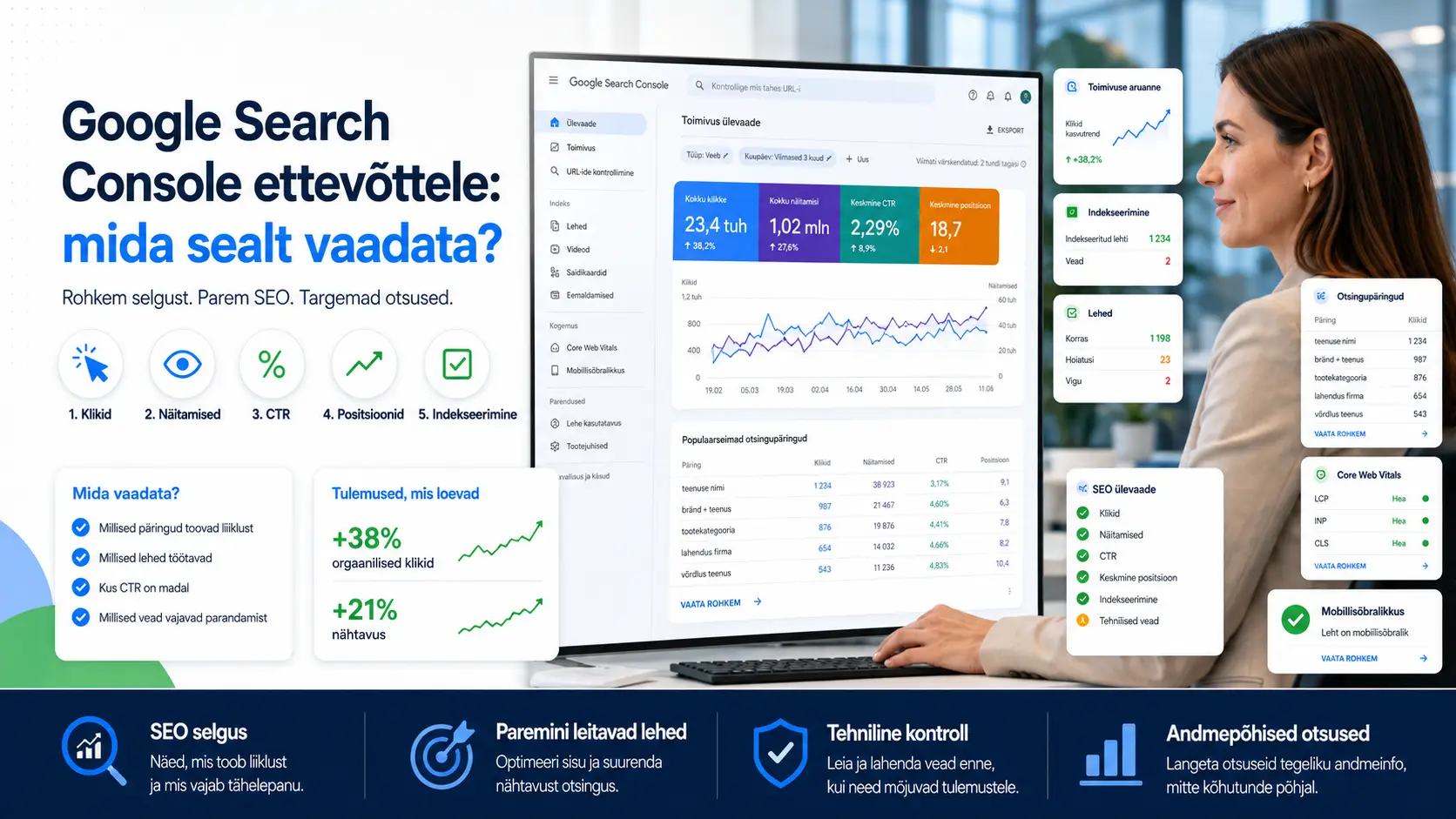
One of the most important parts of Google Search Console is the Performance report. It shows how the website performs in Google Search. There you can look at clicks, impressions, CTR and average position. These four metrics provide a good first picture of whether the website’s organic visibility is growing or not.
Clicks show how many times users reached the website from Google search results. Impressions show how many times the website was visible in search results. CTR shows what share of people who saw the result clicked on it. Average position gives an approximate view of how high the website appeared in search results.
For a company, it is not enough to look at only one number. If clicks are growing, that is a good sign. If impressions are growing but clicks are not, titles and descriptions may need to be improved or positions may need to be raised. If positions improve but inquiries do not come in, it is necessary to check whether the traffic goes to the right pages and whether the website can convince the user.
In the Performance report, it is worth looking at:
- changes in clicks over time;
- growth or decline in impressions;
- CTR on important pages;
- average position for main keywords;
- queries;
- pages;
- countries and devices;
- search types, when relevant.
The Performance report does not only provide an SEO overview. It also helps understand market demand and user interest.
Queries: which keywords does the website appear for in Google?
Queries are one of the most valuable parts of Search Console. They show which words and phrases people entered into Google when the company website appeared in search results. This gives a very good view of how Google understands the website and which topics the company is already visible for.
For a company, it is important to look not only at the keywords that bring many clicks, but also at the ones that receive many impressions. If a keyword receives many impressions but few clicks, it may mean that the page is visible, but not high enough or not convincing enough in the search result.
The Queries report also helps find new content opportunities. Sometimes a website appears in searches for phrases that the company has not intentionally optimized for. If such a query is commercially interesting, it can become a new blog article, service page or an idea for improving an existing page.
For example, if a digital marketing company sees that a page appears for the query “why Google Ads does not bring inquiries”, this could become a separate detailed article. If a construction company sees queries such as “apartment renovation price” or “how to choose a construction company”, these can be good content topics.
In the Queries report, it is worth looking at:
- which queries bring the most clicks;
- which queries receive many impressions but few clicks;
- which queries are commercially valuable;
- whether the website appears for searches related to the right services;
- whether new unexpected keywords appear;
- which queries need better content or a separate page.
Keyword analysis in Search Console is especially valuable because it is based on real data, not only on estimates from keyword tools.
Pages: which pages bring organic traffic?
The Pages report shows which pages of the website receive clicks and impressions from Google. This is very important because not all pages work equally. One blog article may bring a lot of traffic, while a service page may receive fewer visits but bring more valuable inquiries.
For a company, it is important to check whether visibility comes to the pages that support business goals. If most organic traffic comes from general blog articles but service pages do not get visibility, service pages may need to be strengthened. If service pages receive impressions but not clicks, metadata and positions should be reviewed.
The Pages report also helps find places for content improvement. For example, if an article receives many impressions but the average position is low, the content can be expanded, internal links can be added, the structure can be improved or headings can be changed. If a page used to perform well but clicks are falling, the reason may be competition, outdated content or a technical issue.
In the Pages report, it is worth looking at:
- which pages bring the most clicks;
- which pages receive many impressions;
- which pages have low CTR;
- which service pages are visible;
- which articles support SEO growth;
- whether important pages are visible in Google at all;
- which pages need updating.
Good SEO does not only mean creating new pages. Often, improving existing pages based on Search Console data can bring very good results.
CTR: why do some results get few clicks?
CTR, or click-through rate, shows what share of people click on a website’s search result after seeing it. If a page receives many impressions but has a low CTR, it means that people see the result but do not choose it often enough.
Low CTR can occur for several reasons. The page may be positioned too low. The title may be unclear. The meta description may be weak, or Google may show a less convincing text fragment instead of the description. Search results may also contain many ads, maps, image blocks or other elements that take attention away.
For a company, pages with low CTR are often a good growth opportunity. If Google already shows the page, you do not need to start from zero. Sometimes it is enough to write a better meta title, a more precise meta description or adjust the page content so it better matches search intent.
For example, if a page appears for the query “Google Ads service”, but the meta title is simply “Services | Visibilion”, it does not give the user enough reason to click. A better title could be “Google Ads service for companies in Estonia | Visibilion”. It is more precise and matches the search better.
When analysing CTR, it is worth looking at:
- which pages have many impressions but few clicks;
- which queries have low CTR;
- whether title and description match search intent;
- whether the main keyword is in the title;
- whether competitors’ search results are stronger;
- whether the page position is too low.
Improving CTR can bring more traffic even without writing new articles.
Average position: how should you understand it?
Average position shows approximately where the website appears in Google search results. However, this metric must be interpreted carefully. It is an average value based on different queries, devices, locations and search results. That is why it may not always match what one specific person sees in Google.
For example, a page may be in position 3 for one keyword and position 45 for another. The average position may then look mediocre, although the page is actually performing very well for one important query. Therefore, it is not enough to look only at the overall average position of the whole website. It is much more useful to analyse positions by specific queries and pages.
For a company, it is important to find keywords that are already close to the first page or the middle of the first page. If the query is commercially valuable and the page is, for example, in positions 8–20, improving the content, adding internal links or strengthening metadata may help move it higher.
Average position is especially useful for tracking trends. If the positions of important queries improve over time, SEO is moving in the right direction. If they decline, it is necessary to analyse whether competitors have become stronger, the content is outdated or a technical issue is affecting visibility.
When looking at average position, it is worth remembering:
- it is an average, not an absolute ranking;
- one page can appear for many different queries;
- it is important to look at positions by query and page;
- the trend is often more important than one isolated number;
- a low position with many impressions can be a growth opportunity.
Average position is a useful metric, but it should always be viewed together with clicks, impressions and CTR.
We help turn Search Console data into clear conclusions.
We look at which queries, pages and SEO issues need attention.
Indexing: can Google access the important pages?
The indexing reports in Google Search Console show whether Google has found the website’s pages and added them to its index. This is very important from an SEO perspective. If an important service page or article is not indexed, it cannot bring traffic from Google Search.
Indexing problems can happen for different reasons. A page may accidentally have a noindex tag, the robots.txt file may block it, the page may return a technical error, the sitemap may be incomplete or Google may decide that the page is not valuable enough to index. Sometimes the problem is technical, sometimes it is content-related.
For a company, this means that it is worth regularly checking in Search Console whether important pages are fine for Google. Especially after publishing new pages, updating the website or making larger technical changes, it is reasonable to check indexing.
When a new article or service page has been published, you can use the URL Inspection tool in Search Console. It shows whether Google knows the page, whether it is indexed and whether indexing can be requested if needed.
When looking at indexing, it is worth checking:
- whether important service pages are indexed;
- whether new blog articles reach Google;
- whether the sitemap has been added and works properly;
- whether Google sees the page correctly;
- whether an important URL is blocked;
- whether pages have a noindex problem;
- whether there are server or redirect errors.
If a page is not indexed, it cannot really be used for SEO. That is why indexing checks are one of the foundations of technical SEO.
Sitemap: why is it important?
A sitemap helps Google better understand which pages exist on the website and which URLs could be indexed. Most modern CMS platforms and SEO plugins create a sitemap automatically, but that does not mean it should not be checked.
In Google Search Console, you can submit a sitemap and see whether Google can read it. If the sitemap works correctly, it helps Google find new and important pages faster. If the sitemap contains errors, old URLs, broken pages or unnecessary pages, it can create confusion.
For a company, it is important that the sitemap contains the pages that should be shown in Google. For example, service pages, blog articles, categories and important landing pages should be included in the sitemap. At the same time, technical, duplicated or low-value pages do not need to be included.
When checking a sitemap, it is worth looking at:
- whether the sitemap has been added to Search Console;
- whether Google reads it successfully;
- whether important pages are included in the sitemap;
- whether the sitemap does not contain old or broken URLs;
- whether the structure is correct on multilingual pages;
- whether the sitemap updates after new pages are added.
A sitemap does not automatically guarantee good rankings, but it helps Google discover and understand the website better.
Experience and Core Web Vitals: technical user experience
Google Search Console also shows user experience and Core Web Vitals data. These show how the website works technically, especially in terms of loading speed, interactivity and visual stability. Although these metrics are not the whole foundation of SEO, they can affect both user experience and search results.
For a company, technical user experience matters not only because of Google. If the website is slow, unstable or uncomfortable to use, a potential customer may leave before sending an inquiry. Speed and convenience are especially important on mobile.
The Core Web Vitals report may show whether URLs are in good condition or need improvement. If many pages have poor user experience, it is worth checking whether the problem is large images, heavy design, a slow server, unnecessary scripts or other technical factors.
It is important to understand that Search Console does not always provide a full technical diagnosis, but it helps notice that a problem exists. After that, more detailed tools can be used, such as PageSpeed Insights or a technical audit.
In the experience reports, it is worth looking at:
- whether mobile users have problems;
- whether pages load fast enough;
- whether Core Web Vitals metrics are healthy;
- whether the problem affects individual URLs or the whole site;
- whether technical changes improve the situation over time.
Good SEO is not only text and keywords. Technical quality affects how the user experiences the website and whether they reach the point of sending an inquiry.
Links: which pages receive internal and external links?
Google Search Console also has a Links report that shows internal and external links. External links help understand which other websites refer to the company website. Internal links show how the pages of the company’s own website are connected to each other.
The quality of external links is important in SEO because they can help grow the website’s authority. However, it is not only the number of links that matters, but also their quality and relevance. If a company receives links from partners, media, directories, industry portals or collaboration projects, this can support visibility.
Internal links are also very important, although they are often underestimated. If an important service page receives few internal links, Google may consider it less important. If blog articles do not link to related services, part of the SEO and sales potential remains unused.
In the Links report, it is worth looking at:
- which pages receive the most external links;
- which domains link to the website;
- whether there are suspicious sources among the links;
- which pages receive the most internal links;
- whether important service pages are supported with internal links;
- whether blog articles link to related services.
The Links report is not an everyday tool, but it is worth checking from time to time, especially for SEO strategy and improving internal linking.
URL Inspection: checking a specific page
URL Inspection is a tool that allows you to check one specific URL. It is useful, for example, when you have published a new article, updated a service page or noticed that a page does not appear in Google as it should.
URL Inspection shows whether the URL is in Google’s index, when Google last saw it, whether the page is usable on mobile and whether Google can index it. If needed, indexing can be requested, which may help Google review a new or updated page faster.
For a company, this is especially useful after publishing new content. If you add a new service page or an important blog article, you do not have to simply wait until Google finds it on its own. In Search Console, you can check whether everything is fine and submit the page for indexing.
URL Inspection helps check:
- whether a specific page is indexed;
- whether Google can read the page;
- whether there are issues preventing indexing;
- which canonical URL Google has selected;
- whether mobile usability is fine;
- whether indexing should be requested again after an update.
This is one of the most practical tools in daily SEO work.
How to use Search Console for content planning?
Google Search Console is not only a place for viewing reports. It can also be used for content planning. Because the tool shows real search queries through which people see the website, it helps decide which articles to write, which service pages to improve and which topics to develop further.
For example, if a company sees that an article appears for many related queries but does not answer them thoroughly enough, the article can be expanded. If a service page receives impressions for new phrases, separate blocks or FAQ questions can be added. If a query appears repeatedly but there is no suitable page, this may be an idea for new content.
Search Console helps separate assumptions from real demand. Instead of writing only about topics that seem interesting to the company, it is possible to write about topics that people already search for and for which Google already connects the website with the subject.
For content creation, it is worth looking for:
- queries with many impressions;
- question-based searches;
- long-tail keywords related to services;
- queries with low positions but commercial value;
- articles that need expansion;
- topics that do not yet have a strong dedicated page.
This approach helps create content that is not just “filling the blog”, but supports visibility and inquiry growth.
How often should a company check Search Console?
Search Console does not need to be checked every day if the company does not have a very large website or an active SEO project. But regularity is important. If the data is checked only once a year, many opportunities and problems may remain unnoticed for too long.
For a smaller company, a monthly overview may be enough. Then it is worth looking at clicks, impressions, the most important queries, the best pages and possible technical problems. If active SEO is being done, articles are published regularly or many pages are updated, Search Console should be checked more often.
After major changes, such as launching a new website, changing URLs, migrating the site or rebuilding the SEO structure, Search Console should be checked more frequently. This is exactly when indexing errors, lost URLs, sitemap problems or traffic drops may appear.
A practical rhythm could be:
- a quick check once a week during active SEO work;
- a more detailed overview once a month;
- URL inspection after publishing new content;
- indexing and error checks after technical changes;
- a larger SEO analysis once a quarter.
The value of Search Console grows when it is not viewed randomly, but used for decision-making.
Common mistakes when using Google Search Console
One common mistake is focusing only on the total number of clicks. If clicks grow, everything seems good. If clicks fall, everything seems bad. In reality, it is always necessary to look at what is behind the number. Does the change come from one page, one keyword, seasonality or a technical problem?
Another mistake is looking only at positions. Average position is useful, but it does not provide the full picture. It is more important to understand which queries and pages bring business value. A high position for a keyword that does not bring suitable customers is not always important.
A third mistake is ignoring impressions. Impressions can show future potential. If a page receives many impressions but few clicks, there is an opportunity to improve CTR or content. If impressions grow before clicks, it may be a sign that Google is starting to test the page more actively.
Common mistakes include:
- looking only at general numbers;
- not analysing queries and pages separately;
- not checking indexing problems;
- not using data to improve content;
- not looking at CTR;
- not connecting Search Console data with inquiries and sales;
- panicking over small short-term fluctuations.
Search Console is not just statistics. It is a tool that helps make better SEO and marketing decisions.
Summary: Google Search Console shows how visible the company really is in Google
Google Search Console is one of the most practical tools for monitoring SEO for a company. It shows which searches the website appears for in Google, which pages receive clicks, where unused potential exists and whether Google has problems indexing the website. If a company wants to grow organic traffic and inquiries, this tool should not be ignored.
The most important places to look at are the Performance report, queries, pages, CTR, average position, indexing, sitemap and technical experience reports. Based on this data, it is possible to improve metadata, expand content, strengthen service pages, plan new articles and notice technical issues.
Google Search Console does not show the whole marketing picture on its own, but it provides a very clear view of how the company is visible in Google Search. If this data is used regularly and connected with business goals, SEO becomes a much more conscious and effective channel.
We turn your SEO data into a practical action plan.
Write to us if you want to understand what Google Search Console is really showing about your website.